




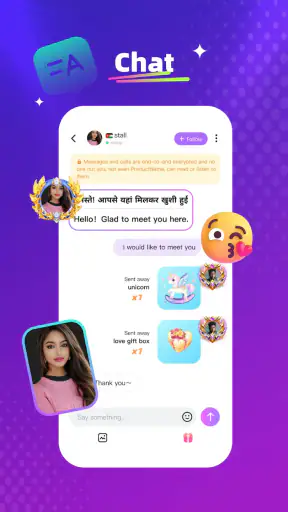
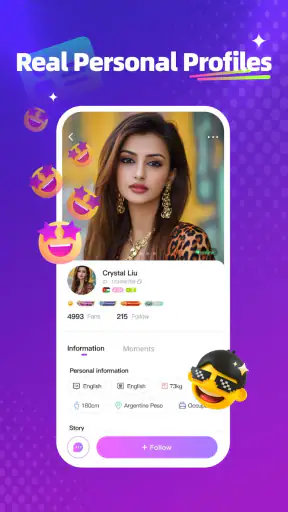
Crush Live is a social app built around live broadcast rooms, and my first impression was that it feels more like a place to drop into an ongoing crowd than a traditional social network. Instead of opening it mainly to scroll through a carefully arranged feed, I would use it when I want to see what people are doing right now, join a room, listen for a while, and decide whether I want to participate. That makes the experience immediate, but also less predictable than a feed-based app.
It is free to download, developed by Crush Fun, and aimed at Teen users. The app has passed one million installs and holds a 3.8 average from around 7.6 thousand ratings, which gives a useful picture: there is a real audience, but the experience will not suit everyone equally. I tested it with the mindset of someone deciding whether it deserves a regular place on a phone, not just a quick launch out of curiosity.
How I use Crush Live without getting lost in the rooms
The simplest workflow is also the most sensible one. I open the app, browse the live rooms, choose something that matches my mood, and spend a few minutes observing before interacting. That short pause matters. A room can look lively from its title or preview, yet the actual conversation may be too fast, too noisy, or simply not relevant to me. Treating the first few minutes as a preview helps avoid committing time to a room that does not fit.
For casual use, I would divide sessions into three stages: discovery, participation, and exit. During discovery, I look for a room where the atmosphere is understandable without needing backstory. During participation, I keep my interaction simple at first, especially if I am new to the people there. When the conversation stops being enjoyable, I leave instead of staying just because I have already spent time there. This sounds obvious, but live social apps can encourage passive lingering.
The app is strongest when I approach it as a shared moment rather than as a replacement for private messaging. If I want to send a carefully written update to one person, a messaging app is more efficient. If I want a polished video feed that I can consume at my own pace, a conventional social platform is usually better. Crush Live makes more sense when I want the feeling of entering a room where other people are already present.
One practical scenario is an evening when I have a little free time but no specific plan. I can open a room, listen while doing a simple household task, and interact only when I have something useful or entertaining to add. That low-commitment style suits the app well. It also reveals one of its limitations: if I need a focused conversation, a reliable schedule, or a quiet space, the live-room format may feel scattered.
What to do during a first session
On a first visit, I would not try to explore every room. I would choose a small selection and compare their pace, tone, and level of participation. Some rooms may be comfortable for watching, while others may expect active conversation. Finding that difference early is more valuable than collecting a long list of rooms that I never return to.
I also recommend deciding what “a good session” means before opening the app. It might be discovering one room worth revisiting, having one pleasant exchange, or simply relaxing for a short time. Without that personal limit, live content can become an endless sequence of room changes. The app supplies variety, but the user has to supply the stopping point.
Because the content rating is Teen, I would still treat every room as a public social space and use ordinary online caution. I would avoid sharing personal details, be careful with direct attention from strangers, and remember that a friendly atmosphere does not automatically mean a private relationship. That is not a criticism unique to Crush Live; it is part of using any live community responsibly.
Settings and habits that make the experience easier
The most useful “settings” are the choices I make before and during a session: whether I want to participate or only watch, how much time I want to spend, and whether I am comfortable with the room’s tone. I would check the app’s available controls when installing it, especially notification behavior and any options related to interaction, because live apps can become distracting when every update demands attention.
Notifications deserve particular attention. If I want Crush Live to remain an occasional entertainment app, I would keep alerts limited to the activity I genuinely care about rather than allowing the phone to pull me back repeatedly. If I am following a room or social circle closely, more alerts may be useful, but that choice can quickly turn a relaxed habit into a constant interruption.
I would also review purchase prompts before spending time in popular rooms. The app is free, but its in-app purchases range from $0.49 to $59.99 per item. That wide range means I would treat virtual spending as a separate decision from enjoying the free parts of the service. Setting a personal limit before entering a highly active room is a better safeguard than deciding in the middle of an exciting conversation.
Another worthwhile habit is to use the app in a stable environment rather than judging it during a rushed commute or while multitasking heavily. Live rooms depend on timing and attention. If I can only glance at the screen for a few seconds, I may miss the context that makes a room enjoyable. When I want background entertainment, listening casually can work, but I would not expect that to provide the same experience as active participation.
Faster ways to find rooms worth returning to
My faster pattern is to create a mental shortlist based on repeatable qualities instead of trying to remember every room name. I look for rooms where the conversation is easy to follow, newcomers are not ignored, and the pace leaves enough space to respond. Those signs are more useful than a busy appearance alone. A crowded room can be energetic, but it can also make a new participant feel invisible.
I would give promising rooms a second visit at a different time before deciding whether they are genuinely useful to me. Live communities change with the people present, so one quiet or chaotic session does not always represent the room’s normal character. This is one of the more important trade-offs in the app: discovery is quick, but judging consistency takes patience.
For repeat use, I would adopt a simple routine. First, enter one familiar room to see whether the atmosphere suits me. Next, try one new room rather than opening many at random. Finally, leave when the session has reached its natural end. This pattern keeps the app from becoming a stream of disconnected previews and gives me a better chance of building familiarity with the communities I actually enjoy.
When I do participate, short contributions work better than trying to dominate the room. A clear greeting, a relevant response, or a light question is enough to test whether the group welcomes interaction. If the room does not respond, I do not take that personally; live conversations move quickly, and the lack of response may simply reflect timing. Moving on is more efficient than repeatedly forcing an opening.
Another non-obvious advantage of this approach is that it separates social confidence from room quality. If I feel uncomfortable in one room, that does not necessarily mean the whole app is unsuitable. I can compare another room with a slower pace or a different subject. Conversely, if every room feels too public or too fast, that is useful evidence that a private messaging app or a smaller community platform would serve me better.
Where the live format reaches its limits
Crush Live is not the right tool for every kind of social connection. Live rooms are naturally dependent on timing, audience behavior, and the willingness of strangers to share attention. I would not choose it for an important conversation, a private plan, or anything that needs a permanent, easy-to-search record. The app’s appeal comes from immediacy, and immediacy also makes interactions less controlled.
The social energy can be a strength when I want company, but a weakness when I want calm. A room may be entertaining one moment and overwhelming the next. New users should expect some trial and error rather than assuming that the first room will represent the entire service. Experienced users can reduce that friction by returning to rooms that match their preferred pace and leaving quickly when the atmosphere is not right.
There is also a difference between watching and belonging. I can enjoy a broadcast without becoming part of its community, but regular participation requires more effort and emotional attention. If I am looking for a structured group with clear topics and predictable moderation, a specialized community app may be a better choice. If I want spontaneous social contact, Crush Live has the more natural advantage.
The purchase system is another boundary I would keep in mind. Free access makes it easy to explore, but social excitement can make optional spending feel like a way to gain visibility or show support. I would never treat purchases as necessary for deciding whether the app is enjoyable. I would first use the free experience, understand the room culture, and only then decide whether any paid item fits my own budget.
Performance expectations should also be realistic. Live content is more demanding than a static timeline because the experience depends on a continuing broadcast and active participation. If my connection, battery situation, or attention is limited, I may prefer a less immediate app. That is not a reason to reject Crush Live outright; it simply means the best use case is a deliberate session, not constant background dependence.
Who will enjoy it most
I think Crush Live is a good fit for people who like discovering personalities and conversations in real time. It suits users who enjoy moving between rooms, observing social dynamics, and occasionally joining in without needing a formal introduction. It can also work for someone who wants light company during downtime and is comfortable with the fact that each session may feel different.
It is less suitable for someone who dislikes public interaction, wants a carefully filtered feed, or becomes frustrated when content has no predictable order. Users seeking one-to-one communication should start with a messaging service. Users who want long-form entertainment may prefer video platforms where they control playback and choose finished content. Crush Live earns its place when the appeal is being present while something is happening.
The Teen rating is worth taking seriously for younger users and families. I would encourage anyone using it to keep conversations respectful, avoid personal disclosures, and make use of the app’s available controls when a room or interaction becomes uncomfortable. The ability to leave a room quickly is valuable, but it is better to establish safe habits before a difficult situation appears.
My verdict after building a repeatable routine
After using Crush Live as a social app rather than merely sampling its busiest rooms, I found its value comes from the combination of immediacy and choice. I can browse until I find a room that matches my mood, participate lightly, and leave without the obligation of maintaining a long conversation. That flexibility is more appealing to me than a rigid social schedule.
At the same time, the app asks me to manage my own attention. The best experience does not come from opening every room or responding to every prompt. It comes from using a small routine: preview before joining, keep notifications under control, avoid impulsive purchases, and return only to communities that consistently feel worthwhile. Those habits make the app feel more intentional and less noisy.
The current version is 1.9.0, and the app supports devices running Android 7.0 or later. That makes it accessible to people using older compatible phones, though I would still keep the operating system and the app updated when possible for a smoother everyday experience. Since it is free to install, trying it costs nothing upfront, but the optional purchases mean I would approach the social side and the spending side as two separate choices.
My recommendation is therefore specific: try Crush Live if you want spontaneous live interaction and are willing to explore until you find the right room culture. Do not choose it expecting a quiet, organized replacement for private messaging or a conventional video feed. The app works best when you control the pace instead of letting the live stream control you. With that mindset, it becomes a pleasant way to find brief moments of shared attention; without it, the same variety can feel unfocused.
For me, Crush Live is worth keeping as an occasional social destination, especially on evenings when I want to browse real-time conversations without arranging anything in advance. I would recommend it to a friend who enjoys meeting a changing crowd online, while warning them to start slowly, protect their time, and spend only with a clear reason. That balance captures both its genuine charm and its most important limitation.


